by Tim C. Lueth, SG-Lib Toolbox: SolidGeometry 5.6 - Geometric Queries
Introduced first in SolidGeometry 2.4, Creation date: 2015-08-08, Last change: 2025-09-14
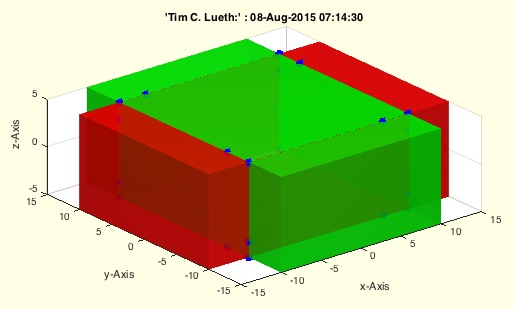
VL=VLcrossingSG(SGA,SGB)
SGA: | Solid A or cell list of solids | |
SGB: | Solid B or cell list of solids |
VL: | Vertex list of all crossing point |
Crossing points of 2 boxes
A=SGbox([30,20,10]);
VLcrossingSG(A,SGtrans(A,rotdeg(90)));
This function, VLcrossingSG, calculates the crossing points of two solid geometries, SGA and SGB. It is designed to be extremely fast and powerful, supporting both individual solids and cell lists of solids.
SGA is a cell array. If true, initialize empty vertex list VL and face list FL. Iterate over each solid in SGA, concatenating their vertex and face lists using VLFLcat2. Convert the combined lists into a solid using SGofVLFL.SGB is a cell array. If true, perform the same operations as in step 1 for SGB.SGA and SGB are collocated using iscollofVLBB. If they are, calculate the crossing points using mesh2meshTL with the face and vertex lists of both solids.VL to an empty array.SGfigure, and set the view angle. Plot SGA in red and SGB in green. Remove duplicate rows from VL and plot the unique crossing points in blue. Use VLFLplotlight to adjust lighting.To find the crossing points of two boxes:
A = SGbox([30,20,10]);
VLcrossingSG(A, SGtrans(A, rotdeg(90)));