CleveSpyder — MATLAB-compatible and Python in one IDE
CleveSpyder turns the Spyder IDE into a place where you can work in MATLAB-compatible code and in Python at the same desk. You type MATLAB-compatible commands, you see MATLAB-compatible results, and with a single word you switch the same console back to ordinary Python. It is built on ClevePython (mtlcompat, a MATLAB-compatible core in Python) and pySGLIB (the SG-Lib ports), and it grows as those grow. See also SG-Lib 2027 — moving to Python.
MATLAB® is a registered trademark of The MathWorks, Inc. ClevePython is independent of and is not affiliated with or endorsed by MathWorks; it reproduces MATLAB-compatible behaviour in Python and does not use MATLAB itself.
For students who want to master both
Many students will have to read and write both languages. CleveSpyder lets them do it in one window, with one interpreter:
- Practise the compact, matrix-oriented MATLAB-compatible style and see its real advantage, instead of fighting unfamiliar notation.
- Type the same line in MATLAB-compatible form and, after
cleve off, in plain Python — and read exactly where the two differ. - Move from a quick console try to a real, saved script without leaving the IDE.
- Someone coming from MATLAB finds Python approachable here; a Python learner meets the MATLAB-compatible style without relearning the environment.
The same .m file in both worlds
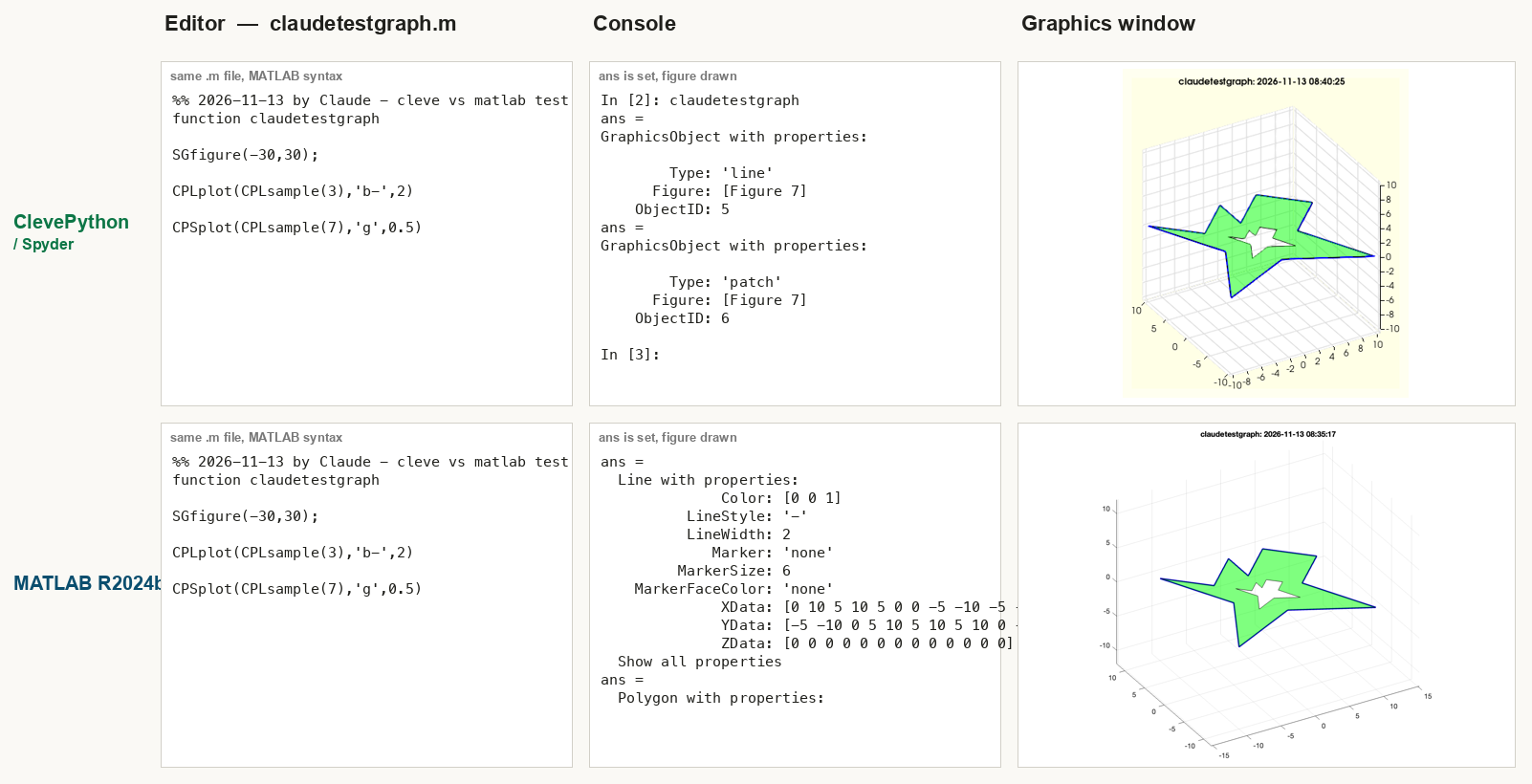
The same .m file — written in MATLAB-compatible syntax — produces the same result whether it runs through ClevePython in Spyder or through the SG-Lib in MATLAB: identical editor code, both consoles set ans and draw, the same figure.
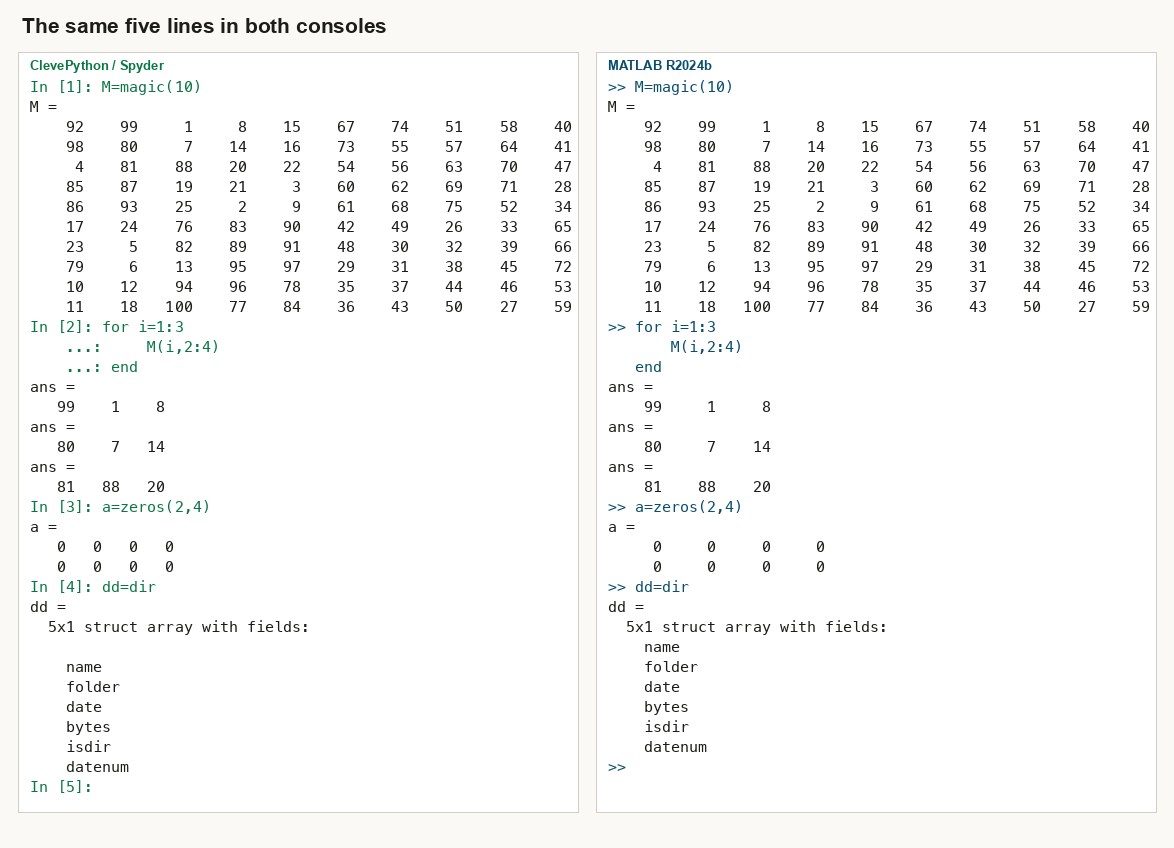
The same five lines in both consoles
Short console input behaves the same way too. The same five lines — magic, a for loop, zeros and dir — produce the same values and the same output in the MATLAB-compatible ClevePython console (left, In [n]:) as in MATLAB (right, >>).
Features
MATLAB-compatible syntax in the console. Type the notation you know and get the result you expect:
| You type | What it does |
|---|---|
[1 2 3] · [1 2;3 4] | matrix entry (spaces = columns, ; = rows) |
1:5 · 5:-2:1 | ranges |
A(2,1) · A(1,:) · A(1,end) | 1-based indexing, end for the last element |
S.VL · S.VL(2,1) | struct field access with 1-based index |
A*B · A.*B · A' | matrix / element-wise product, transpose |
A=SGbox · axis on · hold on | a function name without parentheses runs |
[X,Y]=size(A) | several outputs at once |
Real .m files, MATLAB-compatible syntax. Write an actual .m file in the Spyder editor using MATLAB-compatible syntax, save it, and run it from the Spyder console. Functions and scripts both work, and the figures appear in the SG-Lib graphics window.
One console, two languages — cleve on / cleve off. cleve on is the MATLAB-compatible mode; cleve off returns the very same console to ordinary Python; cleve status shows where you are. No restart, no second window.
New-file that matches the mode. With the MATLAB-compatible mode on, New file (Cmd-N) opens a fresh .m file; with it off, you get an ordinary Python file.
A console that behaves the familiar way. Bare names work without imports, an assignment is echoed (x=5 shows x = 5), ans holds the last result, clc clears the console, a bare call draws its figure, numbers are shown in aligned columns, and a trailing ; suppresses the echo.
The editor stays quiet. The code checker understands the setup, so you are not buried under spurious warnings while you write.
A growing bridge
CleveSpyder is a living port: mtlcompat and pySGLIB are extended continuously, so more MATLAB-compatible syntax and more SG-Lib functions arrive over time. It is an aid for learning and comparing the two languages, currently not yet a complete MATLAB-compatible interpreter — a few spellings still differ or are not yet covered. The point is simple: one IDE in which a student can genuinely work, and think, in both.