SGcell2SG
by Tim C. Lueth, SG-Lib Toolbox: SolidGeometry 5.6 - SG/Solids
Introduced first in SolidGeometry 3.8, Creation date: 2017-05-15, Last change: 2025-09-14
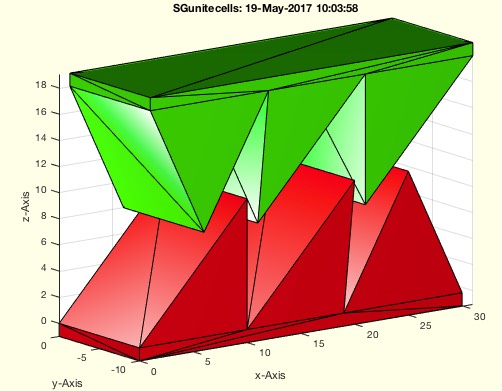
converts all cells into one solid geometry
Description
Old Name was SGunitecells
Quick and Dirty - Does not support frames yet
Better name would be SGcell2SG or SGC2SG
See Also: , SGcat2
, VLFLofSG
, SGofVLFL
Example Illustration
Syntax
SG=SGcell2SG(SGc)
Input Parameter
Output Parameter
Examples
SGcell2SG(SGsample(20))
SGcell2SG(SGsample(23))
Copyright 2017-2025 Tim C. Lueth. All rights reserved. The code is the property of Tim C. Lueth and may not be redistributed or modified without explicit written permission. This software may be used free of charge for academic research and teaching purposes only. Commercial use, redistribution, modification, or reverse engineering is strictly prohibited. Access to source code is restricted and granted only under specific agreements. For licensing inquiries or commercial use, please contact: Tim C. Lueth
Algorithm (Workflow)
This function, SGcell2SG, is designed to convert a collection of solid geometries (SG) stored in a cell array into a single solid geometry structure. It is part of the SG-Library and was developed by Tim Lueth.
Input Parameters
- SGc: A cell array containing multiple solid geometries, represented as
{SGA; SGB; SGC;}.
Output Results
- SG: A structure containing two fields,
SG.VL and SG.FL, which represent the vertices list and face list of the combined solid geometry.
Algorithm Steps
- Check if the input
SGc is a cell array using iscell(SGc).
- If
SGc is a cell array:
- Set
cell to true.
- Call the function
VLFLofSG(SGc) to obtain the vertices list (VL) and face list (FL) of the combined solid geometry.
- Assign these lists to
SG.VL and SG.FL.
- If
SGc is not a cell array, assign SGc directly to SG.
- Call
SGstripfields(SG) to remove any unnecessary fields from the SG structure.
- If no output is requested (
nargout==0):
- Open a new figure using
SGfigure and set the view angle to view(-30,30).
- If
SGc is a cell array, iterate over each element in SGc and plot it using SGplot with a color determined by colofn(i,'rgbmcywk').
- If
SGc is not a cell array, plot SG using SGplot.
Algorithm explaination created using ChatGPT on 2025-08-18 23:38. (Please note: No guarantee for the correctness of this explanation)
Last html export of this page out of FM database by TL: 2025-09-21